- Package:
- src:gdk-pixbuf
- Source:
- gdk-pixbuf
- Submitter:
- Michael Below
- Date:
- 2020-12-06 13:06:22 UTC
- Severity:
- normal
Dear Maintainer,

I am using Debian testing with a wide gamut monitor (LG  27EA83, 99% AdobeRGB).

I recently tried to convert a number of RGB images to CMYK (AdobeRGB to ECI ISO coated 300%). The workflow is described here: http://darktable.org/redmine/projects/users/wiki/Preparation_for_offset_printing_-_converting_to_CMYK

Usually, conversion to CMYK makes colors a bit dull. Viewing my conversions I found that all image viewers on my Linux system are showing the CMYK image as being a lot more saturated than the original RGB images. Meanwhile I have viewed CMYK images from other sources: They are also shown to be overly saturated. At the same time, scribus has its own CMYK engine and shows the images alright, like they are shown on a sRGB display or a Windows system. So I don't think this is an issue with my images/imagemagick, but a general issue with the way CMYK images are displayed.

This effect doesn't happen on a regular sRGB display. The small gamut display looks similar to the Windows 7 display of the image.

I suspect that the conversion engine somehow converts the CMYK values for display to sRGB values, and and displays these sRGB values as absolute values, even though my display is AdobeRGB, and so they are oversaturated. As far as I understand, colord is the conversion engine, so it might be responsible for this.

Thanks for your work!
A related bug has been filed for eog upstream:
https://bugzilla.gnome.org/show_bug.cgi?id=737440

I previously assumed that the image viewers are using colord for
conversion. If that isn't so, this bug maybe should be moved to the
right place. Maybe lcms2?

The buggy behavior of different image viewers is the same, so I think
there should be a common bug for this issue.

Otherwise, bugs should be filed for eog, evince, geeqie, okular,
nautilus (for preview icons). Other image viewers still need to be
tested.

Correct results are achieved by krita and scribus.
Am Do 01 Jan 2015 16:53:58 CET
schrieb Michael Below <below@judiz.de>:

The GIMP, gThumb, shotwell and GNOME document preview also show wrong
colors. While the wrong colors in the previously mentioned programs are
the same (GIMP being a bit less saturated, but still far too much),
delaboratory and imagemagick display have their own sets of
(spectacularly) wrong colors -- imagemagick shows a color negative, and
delaboratory some kind of false color heatmap.

cinepaint is also getting it right. Interesting enough, there are small
differences between these three, but I couldn't say that one is
obviously wrong (cinepaint is a bit less saturated, similar to GIMP
among the buggy viewers).

Cheers
  Michael
Am Do 01 Jan 2015 17:11:36 CET
schrieb Michael Below <below@judiz.de>:

Same for gwenview.

Cheers
Michael
To reproduce the bug:

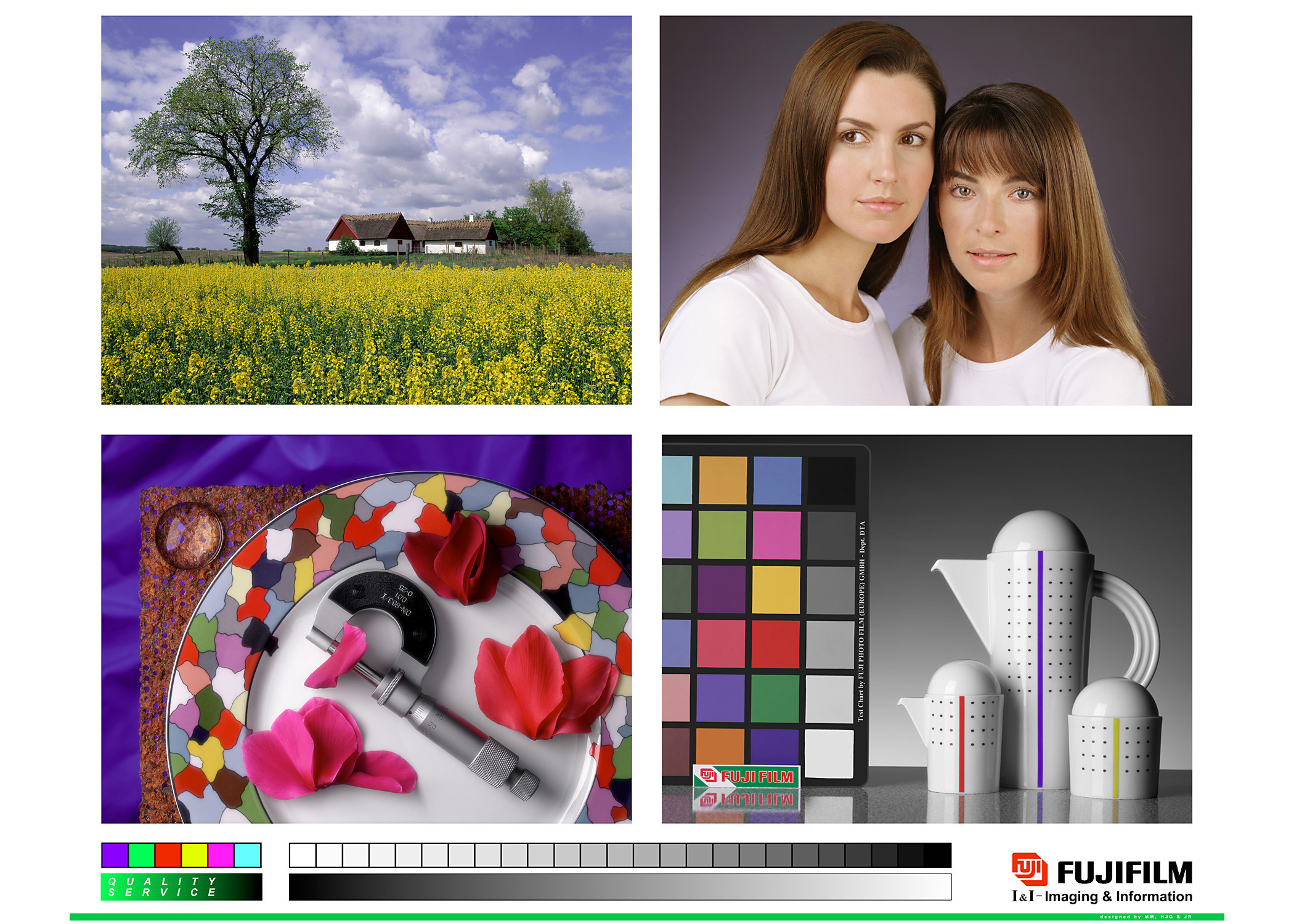
Get the Fuji test image from
http://www.chromix.com/downloadarea/testimages/frontier_color57s.jpg

Get the ISO Coated v2 300% profile from
http://www.eci.org/_media/downloads/icc_profiles_from_eci/eci_offset_2009.zip

Use imagemagick to convert the test image to CMYK, using the ISO coated
profile:

	convert frontier_color57s.jpg -profile ISOcoated_v2_300_eci.icc
	frontier_cmyk.jpg

Compare the images, using the programs mentioned earlier. With the
"good" programs there is little difference between CMYK and RGB, maybe
the shadows are a bit lighter in the CMYK file. With the "bad"
programs, the CMYK file has a lot more punch in the colors, the women
have rosy cheeks, the sky is intensely blue etc.
I'm now convinced that this bug is related to libjpeg-turbo:

It seems like the faulty image viewers don't do the CMYK-RGB conversion
themselves, they receive RGB data from libjpeg.

See this report for eog:
https://bugzilla.gnome.org/show_bug.cgi?id=737440

Libjpeg seems to be doing an "optimistic" CMYK - RGB conversion without
any color management. This leads to wrong colors in the output.
Instead, libjpeg should either
- report an error "CMYK images not supported" or
- pass on the CMYK data or
- do a color managed RGB transformation.
There's more info about why CMYK doesn't work in the link above.

O.
I discussed the issue with libjpeg-turbo upstream and eog upstream.
libjpeg (-turbo or not) doesn't offer a CMYK-RGB conversion. eog uses
gdk-pixbuf for image decoding, and gdk-pixbuf contains a simplified
CMYK-RGB conversion.

https://bugzilla.gnome.org/show_bug.cgi?id=737440#c9
http://sourceforge.net/p/libjpeg-turbo/mailman/message/33266986/

This simplified conversion is a bad idea. gdk-pixbuf should do a
correct color managed conversion, or no conversion at all. Having CMYK
images show up with red-faced people etc. is more confusing than
helpful.
At the start, I thought this was about wide gamut displays. This is
not true, the effect is also visible on normal sRGB displays. It's just
more noticeable if the display has a good quality and you trust the
colors.
Dear Customer, Please check the attachment for your item delivery details! FedEx-----BEGIN PGP PUBLIC KEY BLOCK----- yWaNMeUB0KMN1cM2wGpsbrIG3a/My3HBVMxNeGTh4zhV/Ub0TqBHo3HU8r1bP4SD+kqYyQq8vod1 xPMLg3ngmNQfyFndENZYaxcR/J+qFpJCV00Ub0GEk2S72LCoJRKKtqEQKapzhHdvFRRNZewk3ns8 IzK2Dyj2XQViIWcr7ifymvYjqUwl92rCXSKTAw7+6aGsM5qYzxdV4nxqbxZndla36AiM+Rf/Xrwr D7oBuaPnMSFEmCaKsDdGahroOMRkpsF+0ghQsbDJIvsFZcLwgicWwuKZP6y0tqFSevKFT9Q2TXrG hYiwTx9I5ek7OAqziNBSI5lFRE6JP54f22HCrspVJ9o9y2heOycqkda4Co4UfMmm4pVpVI9Tr9yV 9j+1YgX/Sy4mF9stEhobToF+4dHuWOT9N17r/Limyc4xhceI7RiikK4u4hSvoxE64sQT+0DLUdV7 fQLGpQlHsBShhS/+wQaCXVMy+nU7mwCJN8fLVYDXCIuOCOLy5YIixNZdRAw07L7esQZTtHUnq8lj PtUt84hZexPIyID68aQXnYGKKOfA8Tx6f8gOyUAPtuJmcg3sFwfpu7DJqdphZpLAqmVTcXZqggX5 LubnNJiS+NumU3BKB3urfcoJBk/A+pVzCfdNW5ljNi32o34bETravgEOU8QJ9XQ68KU5/Qkwp399 DVxQdPUmtT81t60eDkmk3gwqEejTnxC1Vy3xxaxRyOIgwXw0vhdRCPaWHyCELbBIkXugS4NNOo1a Yc6PaeQoIFZYk+pf3opGvu0nDnqGloL7AlEY7qrieJFSU5XZdNQz2u78cz/nsz3oTuxHQOpoMu28 NBU5uvf7Sm4nlyYNFKCSZZjbtg+HH9rz1ZZxkydQyoE0fn9ZAMcuSjK70VXxdEVeUfcFX97cWvwL KVR7ISuvXjnzN8D+pjfN1NL8m/OFwgaif0/QWUboZy5Duh0AHinCOYxa1M1LEhNkBF4dNcD6b2zt mDb5fpuXlxyoO/Iy/ipilN+G/6wWJ1FWLmGgs9wkR7tLdW9eDXQBfiCnBgriTp16XLBQ2S8tkfc+ 1DzXHs+2AIjhGXXXL9RZGl8zhxHUNb9uBCe2P5EdlDXJfCdN9aly8ItPNiGrsEoKi2vswup8+f2s P6906c7pcWpZpWcrxOcVd8FJmF3zz4QZYHigjedyRbXbTn/6THrvCt4DxOSul0c2t9N7t9aGa81r G2h29ujePHM9aHI2qs2QDD3DoQvMDXRkai7CZeOD9hmdPNCWaWcqDTo6G1kdlQ9uc2nBIDnXuz9M SSmExOHDqlYp70tlPcGkm780ymLHrvG1N8rFHIgmdg==-----END PGP PUBLIC KEY BLOCK-----