- Package:
- debian-installer
- Source:
- debian-installer
- Description:
- Debian Installer documentation
- Submitter:
- edwin de held
- Date:
- 2022-05-13 20:51:03 UTC
- Severity:
- important
Subject: debian-installer: Installer hangs during 'select and install software'

Dear Debian team

During the installation on a Acer Aspire E11 ES-111-C5Q9 laptop the
system freezes with an installation with both the
debian-8.1.0-amd64-xfce-CD-1.iso image and also
debian-8.1.0-amd64-DVD-1.iso.
The freeze takes place during the 'select and install software' after
'laptop detect' while apt is running. Both with grapical and
non-grapical gui
In this stage of the installation apt is already configured.

On the same system, on a different partition, with the same method I
did a fresh install of linux mint ( kernel 3.16.0-38-generic) , which
is working perfectly so I'm pretty shure there is no malfunctioning of
the hardware.

On the debian file system the following log of apt was found:

/var/log/apt/

Start-Date: 2015-08-02  07:40:18
Commandline: apt-get -o APT::Status-Fd=4 -o APT::Keep-Fds::=5 -o
APT::Keep-Fds::=6 -q -y --no-remove install locales
Install: locales:amd64 (2.19-18)
End-Date: 2015-08-02  07:40:23

Start-Date: 2015-08-02  09:40:27
Commandline: apt-get -o APT::Status-Fd=4 -o APT::Keep-Fds::=5 -o
APT::Keep-Fds::=6 -q -y --no-remove install busybox
Install: busybox:amd64 (1.22.0-9+deb8u1)
End-Date: 2015-08-02  09:40:28

Start-Date: 2015-08-02  09:40:30
Commandline: apt-get -o APT::Status-Fd=4 -o APT::Keep-Fds::=5 -o
APT::Keep-Fds::=6 -q -y --no-remove install initramfs-tools
Install: klibc-utils:amd64 (2.0.4-2, automatic), initramfs-tools:amd64
(0.120), libklibc:amd64 (2.0.4-2, automatic)
End-Date: 2015-08-02  09:40:34

Start-Date: 2015-08-02  09:40:37
Commandline: apt-get -o APT::Status-Fd=4 -o APT::Keep-Fds::=5 -o
APT::Keep-Fds::=6 -q -y --no-remove install linux-image-amd64
Install: linux-image-3.16.0-4-amd64:amd64 (3.16.7-ckt11-1, automatic),
linux-base:amd64 (3.5, automatic), libuuid-perl:amd64 (0.05-1+b1,
automatic), linux-image-amd64:amd64 (3.16+63)
End-Date: 2015-08-02  09:40:57

Start-Date: 2015-08-02  09:41:00
Commandline: apt-get -o APT::Status-Fd=4 -o APT::Keep-Fds::=5 -o
APT::Keep-Fds::=6 -q -y --no-remove install pciutils
Install: pciutils:amd64 (3.2.1-3), libpci3:amd64 (3.2.1-3, automatic)
End-Date: 2015-08-02  09:41:02

Start-Date: 2015-08-02  09:41:04
Commandline: apt-get -o APT::Status-Fd=4 -o APT::Keep-Fds::=5 -o
APT::Keep-Fds::=6 -q -y --no-remove install usbutils
Install: usbutils:amd64 (007-2), libusb-1.0-0:amd64 (1.0.19-1, automatic)
End-Date: 2015-08-02  09:41:07

Start-Date: 2015-08-02  09:41:08
Commandline: apt-get -o APT::Status-Fd=4 -o APT::Keep-Fds::=5 -o
APT::Keep-Fds::=6 -q -y --no-remove install acpi
Install: acpi:amd64 (1.7-1)
End-Date: 2015-08-02  09:41:10

Start-Date: 2015-08-02  09:41:11
Commandline: apt-get -o APT::Status-Fd=4 -o APT::Keep-Fds::=5 -o
APT::Keep-Fds::=6 -q -y --no-remove install acpid
Install: acpid:amd64 (2.0.23-2)
End-Date: 2015-08-02  09:41:15

Start-Date: 2015-08-02  09:41:16
Commandline: apt-get -o APT::Status-Fd=4 -o APT::Keep-Fds::=5 -o
APT::Keep-Fds::=6 -q -y --no-remove install acpi-support-base
Install: acpi-support-base:amd64 (0.142-6)
End-Date: 2015-08-02  09:41:18

Start-Date: 2015-08-02  09:41:19
Commandline: apt-get -o APT::Status-Fd=4 -o APT::Keep-Fds::=5 -o
APT::Keep-Fds::=6 -q -y --no-remove install iw
Install: libnl-genl-3-200:amd64 (3.2.24-2, automatic), iw:amd64
(3.17-1), libnl-3-200:amd64 (3.2.24-2, automatic)
End-Date: 2015-08-02  09:41:23

Start-Date: 2015-08-02  09:41:24
Commandline: apt-get -o APT::Status-Fd=4 -o APT::Keep-Fds::=5 -o
APT::Keep-Fds::=6 -q -y --no-remove install wireless-tools
Install: libiw30:amd64 (30~pre9-8, automatic), wireless-tools:amd64 (30~pre9-8)
End-Date: 2015-08-02  09:41:28

Start-Date: 2015-08-02  09:41:30
Commandline: apt-get -o APT::Status-Fd=4 -o APT::Keep-Fds::=5 -o
APT::Keep-Fds::=6 -q -y --no-remove install wpasupplicant
Install: libpcsclite1:amd64 (1.8.13-1, automatic), libdbus-1-3:amd64
(1.8.18-0+deb8u1, automatic), wpasupplicant:amd64 (2.3-1+deb8u1)
End-Date: 2015-08-02  09:41:34

Start-Date: 2015-08-02  09:41:38
Commandline: apt-get -o APT::Status-Fd=4 -o APT::Keep-Fds::=5 -o
APT::Keep-Fds::=6 -q -y --no-remove install keyboard-configuration
Install: keyboard-configuration:amd64 (1.123)
End-Date: 2015-08-02  09:41:42

Start-Date: 2015-08-02  09:41:44
Commandline: apt-get -o APT::Status-Fd=4 -o APT::Keep-Fds::=5 -o
APT::Keep-Fds::=6 -q -y --no-remove install console-setup
Install: xkb-data:amd64 (2.12-1, automatic), console-setup:amd64
(1.123), console-setup-linux:amd64 (1.123, automatic), kbd:amd64
(1.15.5-2, automatic)
End-Date: 2015-08-02  09:41:54

Start-Date: 2015-08-02  09:44:19
Commandline: apt-get -o APT::Status-Fd=4 -o APT::Keep-Fds::=5 -o
APT::Keep-Fds::=6 -q --no-install-recommends -y -o
DPkg::options=--force-confnew upgrade
Upgrade: libisc-export95:amd64 (9.9.5.dfsg-9, 9.9.5.dfsg-9+deb8u2),
linux-image-3.16.0-4-amd64:amd64 (3.16.7-ckt11-1,
3.16.7-ckt11-1+deb8u2), libssl1.0.0:amd64 (1.0.1k-3, 1.0.1k-3+deb8u1),
libicu52:amd64 (52.1-8, 52.1-8+deb8u2), tzdata:amd64 (2015d-0+deb8u1,
2015e-0+deb8u1), libisccfg-export90:amd64 (9.9.5.dfsg-9,
9.9.5.dfsg-9+deb8u2), libdns-export100:amd64 (9.9.5.dfsg-9,
9.9.5.dfsg-9+deb8u2), libirs-export91:amd64 (9.9.5.dfsg-9,
9.9.5.dfsg-9+deb8u2)
End-Date: 2015-08-02  09:44:47
Some additional information about this bug :

- Choosing ethernet of wifi with or without additional driver
(rtl8168g-2.fw) for network support gives the same error.
(n.b. This driver can only be loaded by means of SD card, not by USB drive.... )

- The frozen screen displays -select and install software- running dpkg ..12%
Hello,

I have encountered the same problem with a Asus ET1620I AIO-computer.

The installation freezes at the 12% mark at "Select and install
software". The device does not response to keyboard input and pressing
the power-button does nothing. (I have to hold the power button down
to perform a forced reboot).

Since I can't change VT I tried changing to no. 4 before the problem
happen to try and see what the last output is before it freezes.

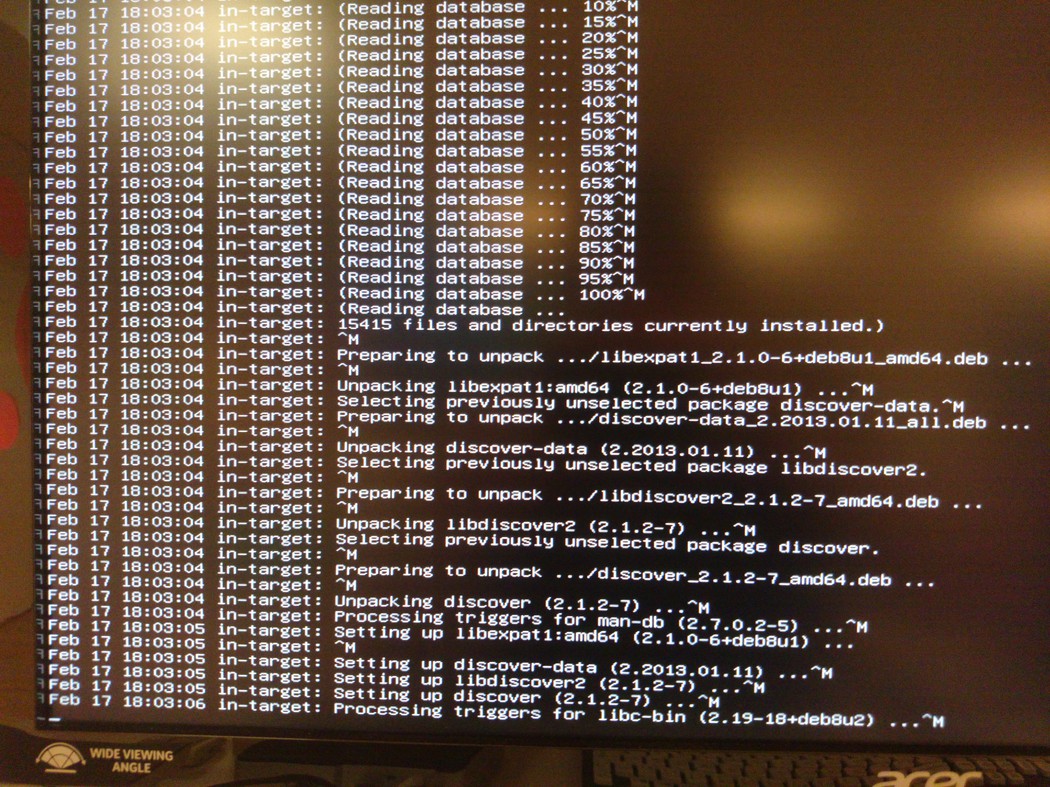
The last output is:


This output seems to come from installing "discover discover-data
libdiscover2 libexpat1". By looking further up on the screen I can see
the familiar "The following NEW packages will be installed" and those
4 packages are in that list.

The ET1620 has a Intel Celeron J1900 processor. It also asks for the
"rtl8168g-2.fw" firmware during hardware detection, and I answered
"No".

I have tried this installation using following ISO-images:

- debian-8.1.0-amd64-netinst.iso
- debian-8.2.0-amd64-netinst.iso

Which I downloaded from the debian-site today.

I will try with the "debian-8.0.0-amd64-netinst.iso" image and see
whether the problem persists.
Both my keyboard and mouse go inactive after selecting "Install",
"Graphical install", any opening menu choice.  At the first screen for
language selection, my mouse and keyboard become inactive.  I'm
installing AMD64 FX-9590 processor and Gigabyte GA-990FX-UDI
motherboard.  All versions (Live, NETINST, CD-1, fxce) of debian 8.2.0
have this problem on my machine.  I tried the Automated install option
too, and it hangs up on the network installation.

Are there "option" fixes or any version of Ubuntu that can be used to
get up and running again?

Thanks for any help,
Richard Kircher
I have the same issue. Install off USB.
Currently hung on 12%
Select and Install Software
Running dpkg

I also selected to not import the Realtek Driver.


PC Specs:
Model: Acer Aspire ES1-512-C12D
CPU: Intel Celeron N2840
Ram: 2GB DDR3 L
Graphics: Built in Intel Chip
HDD: 320GB Sata Drive
Additional info:
I have tried this with the realtek drivers loaded off additional media and
using two other mirrors and it still hangs in the same place.
I encountered this perfectly reproducible exact 12% total freeze bug
using a Jessie installer image dating back a few months on an Intel
J1900 host with integrated Realtek network hardware - I'm afraid I don't
know which Jessie sub-version.

However, on the exact same hardware (including the USB flash dongle),
the Debian installer completed successfully using the
debian-8.2.0-amd64-netinst.iso image.

Users who encountered this bug with a Jessie DI version older than the
8.2.0 that was published in September 2015 might want to try again with
that one.
RegardsSHI
Hi,

I've encountered this same bug, hang on "select and install software -
running dpkg - at 12%"

VT 4 last line shows "in-target: Processing triggers for libc-bin"

Tried with following UNOFFICIAL NON-FREE (becouse realtek firmware request)
images on USB:

http://cdimage.debian.org/cdimage/unofficial/non-free/cd-including-firmware/8.2.0/amd64/iso-cd/firmware-8.2.0-amd64-netinst.iso2015-09-06
13:12  265M

http://cdimage.debian.org/cdimage/unofficial/non-free/cd-including-firmware/stretch_di_alpha4/amd64/iso-cd/firmware-stretch-DI-alpha4-amd64-netinst.iso
2015-10-26 00:36  268M

http://cdimage.debian.org/cdimage/unofficial/non-free/cd-including-firmware/weekly-builds/amd64/iso-cd/firmware-testing-amd64-netinst.iso
2015-11-30 06:59  281M


HW is Lenovo B50-10 laptop with realtek integrated lan/wlan
After many trials installer was able to complete the installation

I used the following image (already used before and failed)
http://cdimage.debian.org/cdimage/unofficial/non-free/cd-including-firmware/weekly-builds/amd64/iso-cd/firmware-testing-amd64-netinst.iso
11/30/2015 06:59 281m


I had tried different BIOS configurations, and in the scenario when it
worked, the last thing I changed in BIOS was an option related to UEFI:
"Boot Priority" [UEFI First]

So after system start I had "EFI USB Device (the one whit debian installer)
has been blocked by the current security policy."

After pressing ok, debian installer started in Legacy boot mode and all
went ok

...but I don't know if it's just a coincidence...
I had the same issue with 8.2, and Xubunt 15.10.

My workaround was to disable the WLAN interface in the BIOS.

Regards,
Lev
Just had the same issue on Intel J1900 net-top (Gigabyte BRIX 1900) using
the SteamOS installation.Symptoms are: installer hangs after triggering
libc-bin.
Since BIOS did not provide an option disabling WLAN had to disconnect it
physically. This helped - it was able to finish the installation.
I'm having this issue on a Intel NUC (Intel Atom E3815).

Is literally impossible to install Debian 8.

Tried with the following:

 - debian-8.3.0-amd64-netinst.iso (with internet on the NUC)
 - debian-8.3.0-amd64-CD-1.iso (without network connection).

Booting from a usb device that was created via the usual:

$ dd if=image.iso of=/dev/sdX bs=4k

It always freezes on the step

in-target: Setting up discover (2.1.2-7) ...
in-target: Processing triggers for libc-bin (2.19-18+deb8u1) ...

step as seen on the debug console (alt+f4).

Even the cursor stops blinking and it will ignore any key press
combination. Freezes completely 100% of the times.

Here is a picture of the freeze just after it happens:
http://people.igalia.com/clopez/di8_freezes_discover_libctriggers.jpg

Tried installing in DOS mode and in UEFI mode. Didn't make any difference.

This machine don't has any wlan device as the previous reported

I ended workaround this by installing Debian wheezy
<debian-7.8.0-amd64-netinst.iso> and dist-upgrading after the install.

The triggers for libc-bin in Jessie only seems to contain this:

$ dpkg -I libc-bin_2.19-18+deb8u2_amd64.deb triggers
interest ldconfig


I wonder what can be causing this issue :\

I already had this issue when installing a fresh Debian 8 in another
machine, but in that one only happened once. After a hard-reboot and a
retry it worked. With this Intel NUC machine happened everytime of the 4
times I tried to install it.
$ discover-modprobe

If i run it with -x i see that it freezes here:

++++ readlink -f /sbin/discover-modprobe
+++ '[' 0 = 1 ']'
++ FANCYTTY=
++ '[' -e /etc/lsb-base-logging.sh ']'
++ true
+ . /etc/default/rcS
+ '[' -d /var/discover ']'
+ nop=
+ verbose=false
+ getopts nv ch
+ shift 0
++ grep -E -v '^ *$'
+++ uname -r
++ /sbin/discover --data-path=linux/module/name --data-path=linux/module/options '--format=%s %s' --data-version=3.16.0-4-amd64 all


And If i run the above comand with strace -f, then it freezes here:


read(3, "C Camera/Webcam controller'/>\n  "..., 4096) = 4096
brk(0x145e000)                          = 0x145e000
read(3, "een'/>\n  <device vendor='1bfd' m"..., 4096) = 4096
read(3, "2 U-Boot Bootloader'/>\n  <device"..., 4096) = 4096
read(3, "ideo Player'/>\n  <device vendor="..., 4096) = 4096
read(3, "20 Spinnaker 802.11g [Intersil I"..., 4096) = 4096
read(3, " vendor='2001' model='f117' mode"..., 4096) = 4096
read(3, "='2040' model='6503' model_name="..., 4096) = 4096
read(3, "del='0002' model_name='Wally 2.4"..., 4096) = 4096
read(3, "='22b8' model='4a01' model_name="..., 4096) = 4096
read(3, "\n  <device vendor='2304' model='"..., 4096) = 4096
read(3, "='2735' model='100e' model_name="..., 4096) = 4096
read(3, "or='3923' model='1f00' model_nam"..., 4096) = 4096
brk(0x147f000)                          = 0x147f000
read(3, "' model_name='Optical Wheel Mous"..., 4096) = 4096
read(3, "c' model='8115' model_name='Wire"..., 4096) = 4096
read(3, "ice vendor='4317' model='0701' m"..., 4096) = 4096
read(3, "2 Card Reader'/>\n  <device vendo"..., 4096) = 4096
read(3, "<device vendor='8086' model='004"..., 4096) = 4096
read(3, "l_name='MCS7703 Serial Port Adap"..., 4096) = 4096
read(3, "del_name='Astribank 2 series'/>\n"..., 4096) = 1459
read(3, "", 4096)                       = 0
read(3, "", 4096)                       = 0
close(3)                                = 0
munmap(0x7f598aea2000, 4096)            = 0
open("/proc/bus/usb/devices", O_RDONLY) = -1 ENOENT (No such file or directory)
openat(AT_FDCWD, "/dev/bus/usb", O_RDONLY|O_NONBLOCK|O_DIRECTORY|O_CLOEXEC) = 3
getdents(3, /* 5 entries */, 32768)     = 120
close(3)                                = 0
openat(AT_FDCWD, "/dev/bus/usb", O_RDONLY|O_NONBLOCK|O_DIRECTORY|O_CLOEXEC) = 3
getdents(3, /* 5 entries */, 32768)     = 120
getdents(3, /* 0 entries */, 32768)     = 0
close(3)                                = 0
openat(AT_FDCWD, "/dev/bus/usb/003", O_RDONLY|O_NONBLOCK|O_DIRECTORY|O_CLOEXEC) = 3
getdents(3, /* 4 entries */, 32768)     = 96
open("/dev/bus/usb/003/002", O_RDWR


It don't freezes always, only sometimes.

Comparing the straces from when it freezes which the straces when it doesn't I see the following difference:

* This is when it works ok (don't freezes):


openat(AT_FDCWD, "/dev/bus/usb/003", O_RDONLY|O_NONBLOCK|O_DIRECTORY|O_CLOEXEC) = 3
getdents(3, /* 3 entries */, 32768)     = 72
open("/dev/bus/usb/003/001", O_RDWR)    = 4


* This is when it freezes:

openat(AT_FDCWD, "/dev/bus/usb/003", O_RDONLY|O_NONBLOCK|O_DIRECTORY|O_CLOEXEC) = 3
getdents(3, /* 4 entries */, 32768)     = 96
open("/dev/bus/usb/003/002", O_RDWR


Seems that when it freezes it finds 4 entries in the directory /dev/bus/usb/003 instead of 3,
and when it tries to open the "ghost" entry it freezes completely.

ls -al /dev/bus/usb/003 gives 3 entries : (".", "..", "001")

I have been rebooting it a couple of times and doing an ls to see if I see 4 entries.
And when i get 4 entries, trying to access it causes a freeze.

ls -al /dev/bus/usb/003
total 0
drwxr-xr-x 2 root root       80 Feb 17 20:51 .
drwxr-xr-x 5 root root      100 Feb 17 20:51 ..
crw-rw-r-- 1 root root 189, 256 Feb 17 20:51 001
crw-rw-r-- 1 root root 189, 257 Feb 17 20:51 002


$ lsusb
# <... freeze>

The information about /dev/bus/usb/003 is:

# lsusb -D /dev/bus/usb/003/001
Device: ID 1d6b:0003 Linux Foundation 3.0 root hub
Device Descriptor:
  bLength                18
  bDescriptorType         1
  bcdUSB               3.00
  bDeviceClass            9 Hub
  bDeviceSubClass         0 Unused
  bDeviceProtocol         3
  bMaxPacketSize0         9
  idVendor           0x1d6b Linux Foundation
  idProduct          0x0003 3.0 root hub
  bcdDevice            3.16
  iManufacturer           3 Linux 3.16.0-4-amd64 xhci_hcd
  iProduct                2 xHCI Host Controller
  iSerial                 1 0000:00:14.0
  bNumConfigurations      1
  Configuration Descriptor:
    bLength                 9
    bDescriptorType         2
    wTotalLength           31
    bNumInterfaces          1
    bConfigurationValue     1
    iConfiguration          0
    bmAttributes         0xe0
      Self Powered
      Remote Wakeup
    MaxPower                0mA
    Interface Descriptor:
      bLength                 9
      bDescriptorType         4
      bInterfaceNumber        0
      bAlternateSetting       0
      bNumEndpoints           1
      bInterfaceClass         9 Hub
      bInterfaceSubClass      0 Unused
      bInterfaceProtocol      0 Full speed (or root) hub
      iInterface              0
      Endpoint Descriptor:
        bLength                 7
        bDescriptorType         5
        bEndpointAddress     0x81  EP 1 IN
        bmAttributes            3
          Transfer Type            Interrupt
          Synch Type               None
          Usage Type               Data
        wMaxPacketSize     0x0004  1x 4 bytes
        bInterval              12
        bMaxBurst               0
Hub Descriptor:
  bLength              12
  bDescriptorType      42
  nNbrPorts             1
  wHubCharacteristic 0x000a
    No power switching (usb 1.0)
    Per-port overcurrent protection
  bPwrOn2PwrGood       10 * 2 milli seconds
  bHubContrCurrent      0 milli Ampere
  bHubDecLat          0.0 micro seconds
  wHubDelay             0 nano seconds
  DeviceRemovable    0x00
 Hub Port Status:
   Port 1: 0000.02a0 5Gbps power Rx.Detect
Binary Object Store Descriptor:
  bLength                 5
  bDescriptorType        15
  wTotalLength           15
  bNumDeviceCaps          1
  SuperSpeed USB Device Capability:
    bLength                10
    bDescriptorType        16
    bDevCapabilityType      3
    bmAttributes         0x02
      Latency Tolerance Messages (LTM) Supported
    wSpeedsSupported   0x0008
      Device can operate at SuperSpeed (5Gbps)
    bFunctionalitySupport   3
      Lowest fully-functional device speed is SuperSpeed (5Gbps)
    bU1DevExitLat          10 micro seconds
    bU2DevExitLat         512 micro seconds
Device Status:     0x0001
  Self Powered


Trying to read this very same information when /dev/bus/usb/003/002 appears causes a freeze.


So, not sure what is going here, but this looks like either a kernel bug or a firmware bug.


Does this rings any bell? Any ideas?

Regards
On 17/02/16 21:04, Carlos Alberto Lopez Perez wrote:
[...]

This seems very related to this bug reports:

https://bugs.launchpad.net/ubuntu/+source/linux/+bug/1485057
http://thread.gmane.org/gmane.linux.usb.general/129790

Perhaps the same issue.
I had the same problem but acpi=off fixed the issue on my Lenovo laptop.
I got the same issue with an Intel NUC 2820.

I was using the Debian 8.6 installer (ISO on USB key)

dpkg was stuck at 12% during installation.

I updated the bios (v52 to v56) and this seemed to solve the issue.
https://downloadmirror.intel.com/26318/eng/FY_0055_ReleaseNotes.pdf

Changes in version 55:
- Security Enhancements
- Changed the time it takes to enter the power button recovery menu to
4 seconds
- Improved the BIOS update function by disabling the keyboard and
  power button during the flash/recovery process
- Added Windows firmware update function
- Added NVRAM preserved variables: DmiData, UUID, OA3Data
- Fixed an issue that when the User Access Level= limited, the User
  could still access the following restricted Setup options:
  Minimum/Maximum Duty Cycle (%); Primary/secondary Temperature Sensor
- Updated Visual BIOS to 2.2.20 from 2.2.19
- Hotfix to remove download driver and automatic BIOS update feature

Changes in version 53:
- Changed the time it takes to enter the power button menu to 3 seconds
  after G3 sleep state
- Changed the time it takes to enter the power button menu to 4 seconds
  after S4/S5 sleep state

I fail to see anything that might be related to our issue... But then I
don't understand the issue either.
I've seen this bug with both 8.6.0 and testing (-amd64-netinst).
I prepared the USB (8564:1000 Transcend Information, Inc. JetFlash) with
sudo cp path/to/netinst.iso /dev/sdb
I've never verified the images' integrity/authenticity.

The box has an Intel® Celeron® J1900 2.0 GHz processor and (according
to 3.16.36 kernel) three I210 Gigabit [8086:1533] (rev 03) Ethernet
ports, one [8086:0f35] Intel Z36xxx/Z37xxx USB xHCI, one [8086:0f34]
Intel Z36xxx/Z37xxx USB EHCI.
With 8.6.0 and the keyboard in the USB 3 socket, after selecting
"Install" the keyboard stops working; moving it in one of the USB 2.0
socket fixes the issue.

After seeing the bug ("Select and install software - running dpkg -
12%") with 8.6.0, twice with testing, I retried with 8.6.0 (4th time)
but choose the second mirror "ftp.linux.it" and watched the debug log
most of the time. It hung on "Configuring apt - Scanning the mirror...
- 33%". The keyboard stayed operative and the last debug line (ALT+F4)
said "choose-mirror[1971]: DEBUG: command: wget -q
http://ftp.linux.it/debian/dists/jessie/Release -O - | grep -E
'^(Suite|Codename):'". This might be a problem with my network. After
two and a half minutes it told me the mirror did not support jessie. I
choose the standard mirror "ftp.it.debian.org" and the installation
succeded.
I retried (5th time) with 8.6.0, the keyboard was in one of the USB
2.0 sockets and stopped working after selecting "Install". Unplugging
and plugging it in again (in any port) solved the issue. I replicated
the "ftp.linux.it" hanging and again the installation succeded.
I also experience this problem on powerpc net install (mini.iso) . It stalls at ‘Select and Install software’ from the start , at 1%. encountered three times in a row.
Further to my report a little earlier on, I wish to confirm that the repeated problems I had were installing Jessie (stable) in ‘expert mode’; however I now find in default ‘install’ the 'Installation of Extra Software' proceeds after only a brief pause, to match software to the system. I checked by repeating the installation, and it worked again.
I’m sorry I cant provide any more details, as I am new to Debian installation.

SIncerely,
John Plumridge
I'm using "debian-8.7.1-amd64-DVD-1.iso" to install on an intel machine.
Firstly I saw this "rtl8168e-3.fw" missing error. Then as instructed online, I skipped this since a USB disk with those firmware won't work. Then I got stuck at dpkg 12% with "installation".
I tried several times and all failed. Then when I desperately tried "GUI installation", it worked like magic... I don't recall any change but some escape during time zone setup. But anyway, I seriously doubt it's related to realtek driver. Please fix it.
I'm using "debian-live-8.7.1-amd64-standard.iso" on a PPC-3060S Industrial
Panel PC from Advantech. I have the same problem where the installation
process stops at running dpkg - 12%. This behavior is the same on standard
install and GUI install.

The BIOS is Aptio Setup Utility version 5.0.0.9 from American Megatrends.
It has options in "Chipset->South Bridge":
OS Selcetion is by default set to [Windows 7].
XHCI mode is by default set to [disable].
If I change OS Selection for [Linux], XHCI also changes for [Enabled].

Once these options are set the installer no longer stops at 12% Running
dpkg and it completes successfully.

I hope this helps.
Laterly I got some help and it seems there is a install iso that contains more firmwares, just like Ubuntu.
Since I can install Ubuntu 16.10 without problem, I think it should work.
For anyway interested, please search for "firmware-8.7.1-amd64-netinst.iso" and try.
Your are totaly right, for me works downloding firmware from

http://cdimage.debian.org/cdimage/unofficial/non-free/firmware/jessie/current/


Untar in an empty USB drive and use along with USB installation drive,
and  all installation process succed.

Kind Regards,
The problem with the installer freeze at 12% seems to be solved at the
9.0.1 iso. When i did a fresh install (without additional firmware) with
the  "debian-live-9.0.1-amd64-xfce.iso" on the Acer Aspire E11
(ES1-111-C5Q9) the process ended up with a fully working debian
installation.

I previously also tried the "firmware-9.0.0-amd64-netinst.iso" on this
laptop but then the installer hangs again at 12% ( installed discover) .
Hi, I have the same issue  (set-up hangs at language selection on both
simple and grafical installer) while installing debian-9.1.0 (i386-DVD-1 or
netinstall multiarch) on my samsung ativ smart pc xe500tic. Is there any
work-around?

Thanks,
Laura

<https://www.avast.com/sig-email?utm_medium=email&utm_source=link&utm_campaign=sig-email&utm_content=webmail>
Mail
priva di virus. www.avast.com
<https://www.avast.com/sig-email?utm_medium=email&utm_source=link&utm_campaign=sig-email&utm_content=webmail>
<#DAB4FAD8-2DD7-40BB-A1B8-4E2AA1F9FDF2>
I also experienced the same problem.

Hardware is a B&R PPC2100
Intel Atom E3815

Debian 8.8 amd64 freezing @ "dpkg something" during software installation
Debian 9.1 amd64 freezing @ "discover" during software installation

I changed two things before it worked (after trying and searching 2
hours):
- Disabled AHCI in BIOS
- Used the "firmware" version of the iso

Hopefully this saves someone some trouble :-)
First, I want to say, "thank you," to all the people that posted here.  I had the same issue as most people posting on this thread.  The Debian installer hung during "select and install software".  I was using "Debian-9.2.1-amd64-netinst.iso" on the Advantech single board computer, ARK1123.  This SBC uses the same J1900 processor that other people reference in this thread.  I was able to get around it by some changes to my BIOS, similar to what other people have posted.  In my BIOS, I went to Advanced->Misc Configuration->OS Selection.  My 3 options were Windows 7, Windows 8, and Android.  I changed the OS Selection from Windows 7 to Android.  I also disabled all the settings available in Advanced->ACPI menu.  Then it worked.

Brent
Hello, I have the same issue.

Installing debian 9 stretch, both cd (debian-9.5.0-amd64-xfce-CD-1.iso)
and the dvd versions.

Hangs at 12% : at the phase of installing "discover (amd64)"

I tried about 10 times.

Laptop is Packard Bell ENLG71BM-C05U

I used the additional drivers (from
http://cdimage.debian.org/cdimage/unofficial/non-free/firmware/stretch/20180714/),
and I put these .deb packages on another usb key : the effect is that I
don't have the step where they search for firmware for
rtlwifi/rtl8723befw.bin and rtl_nic/rtl8168g-2.fw

I don't have options to disable APCI in the bios.

I managed to install Opensuse on this computer, and there was Windows 10
working properly.

Any suggestion is welcome...
Hi Jean-Louis,

Jean-Louis Deniest <jeanlouisdeniest@ouvaton.org> (2018-07-21):

Can you please switch to vt4 and tell us what the last lines look like?
Bonus points if you can extract the whole /var/log/syslog file (e.g. by
using netcat to another machine); a photograph would probably work too.

Thanks already.


Cheers,
Thanks Cyril.

Here is it.
usb key : debian 9, DVD version

I made screenshots of vt4 during :
- error when searching mirrors - no mirrors were accepted, even usa -
debian. I selected then 'continue with no mirror' (see screenshot 1 &
2). It has happened a few times. > screenshots 1 and 2
- just before the hanging, at the phase of installing discover.

Then, I runned another time the install, and made a few screenshots of
/var/log/syslog, until it hangs.

All screenshots here : https://cloud.owncube.com/s/FyPgZMi9bzQEPoj

Hope it helps...
Hi,

This problem has been solved by updating the bios. Then installation of
9.5.0 went without problems.
Updated bios before starting installation. Still had persistent
hanging following 'installed discover.' Installed Jessie

On Mon, Aug 27, 2018 at 4:30 PM Jean-Louis Deniest <jeanlouisdeniest@ouvaton.org> wrote:
Hi,

I did have the same issue trying to install Debian 9 or 10 : installer get
stuck while "discover installed amd64".

I successful got over this issue since I've changed in the BIOS the default
OS selection from Windows 7 to Windows 8.

Thanks for everyone contribution to this forum. It helped me through.

A plus,

Stephan
I encountered this issue trying to install Buster on a Gigabyte Brix
2807 - hanging at 11% trying to install 'discover'.

Changing the BIOS setting for OS type from Windows 7 to Windows 8 also
fixed it for me.

Thanks all,
Quentin
thank you.

i had the same problem (installer always hangs during "select and
install software" - around 10% of the progress)

my laptop: LENOVO ideapad 100
i install in legacy mode (mbr, not UEFI).

i tried with debian 8, 9 and 10: same problem.

so i read the comments, and in the BIOS i put:
Boot priority: "UEFI first"
OS Optimized Defaults: "Win8"

then i installed debian 9 (with mbr partitioning, as i always do), and
it works.
An unattended installation of Debian 10.6 through preseeding still
hangs at "Select and Install Software". Alt+F4 displays dpkg-divert ...

Dashi Cao
--
Good day.

I sent you an email yesterday, did you receive it? It is a very important
message, anyway reply back to confirm that you already got my message to
enable me give you more details..

Best Regards.
Mrs. Ameena Essa
Good day Friend.

I wish to seek your cooperation for a profitable business alliance of mutual benefit, kindly revert back if interested on ( benkbrucesr@outlook.com ) for more details.

Regards
Ben Koffi