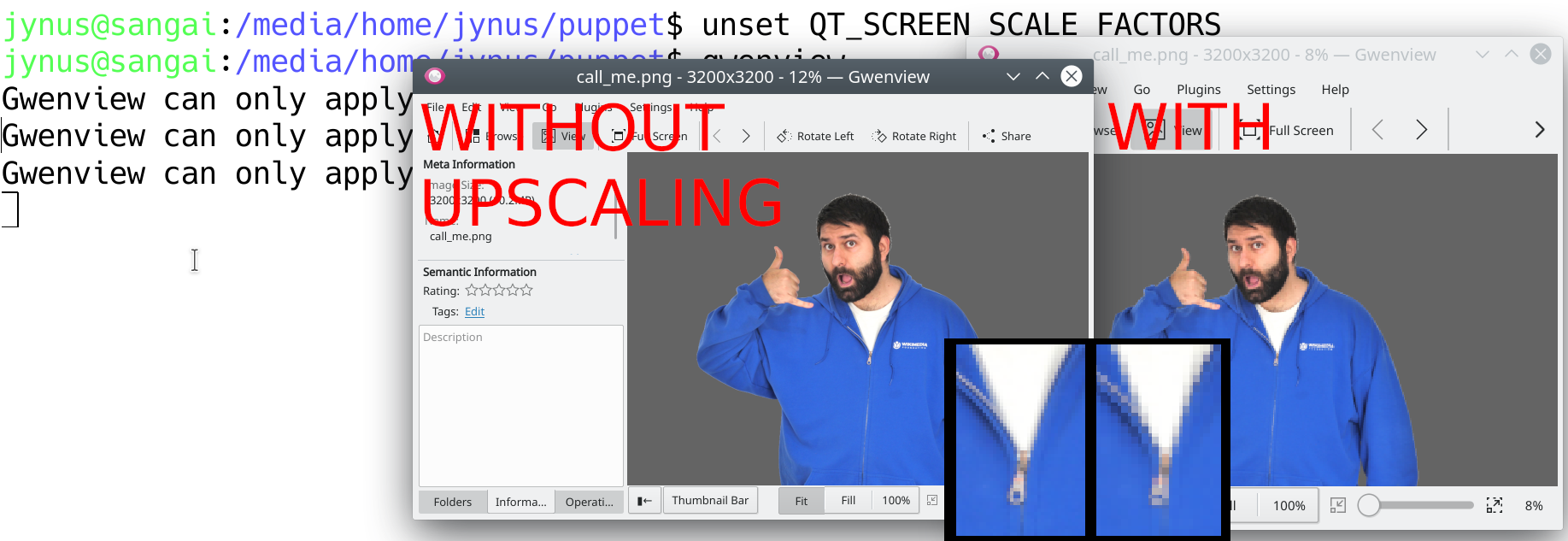
Dear Maintainer,

On high DPI monitors (1440p, 4K), where KDE configuration is
set to upscale the interface in System Settings > Hardware >
Display and Monitor > Scale Display > Scale - greater than 1x
(othewise ui elements are too small), gwenview ui seems
correct, but the images it displays are upscaled, making them
blurry/with high pixel blocks (low resolution).

I've uploaded a screenshot to
https://jynus.com/side_by_side.png so you can understand
what I am talking about.

On another application, a-non perfectly crisp image would be
a minor issue, but on an application made explicitly to
visualize images this is a larger issue, impacting its main
functionality (images are shown, but they look bad)-
specially for photography visualization.

To workaround the problem, one can do:

unset QT_SCREEN_SCALE_FACTORS

Before runing gwenview so the upscaling is cancelled for this
application only and the images are shown with an appropiate
resolution.

I belive this to be the same issue as the one tracked
upstream at:

https://bugs.kde.org/show_bug.cgi?id=373178